

Running a successful HVAC business today takes more than good technicians and steady demand. You need the right systems in place to handle scheduling, invoicing, payments, communication and everything in between.
When the software you rely on is set up properly and actually used the way it’s meant to be used, your HVAC business will thrive.
How the Stack Fits Together
Before getting into individual tools, it helps to understand how they connect.
The stack breaks into four layers: getting the work (Energy Circle, Podium), doing the work (Housecall Pro or ServiceTitan, Avoca, BluOn, measureQuick), tracking the money (QuickBooks, Ply), and keeping everything running (Slack, Gmail, WorkHero).
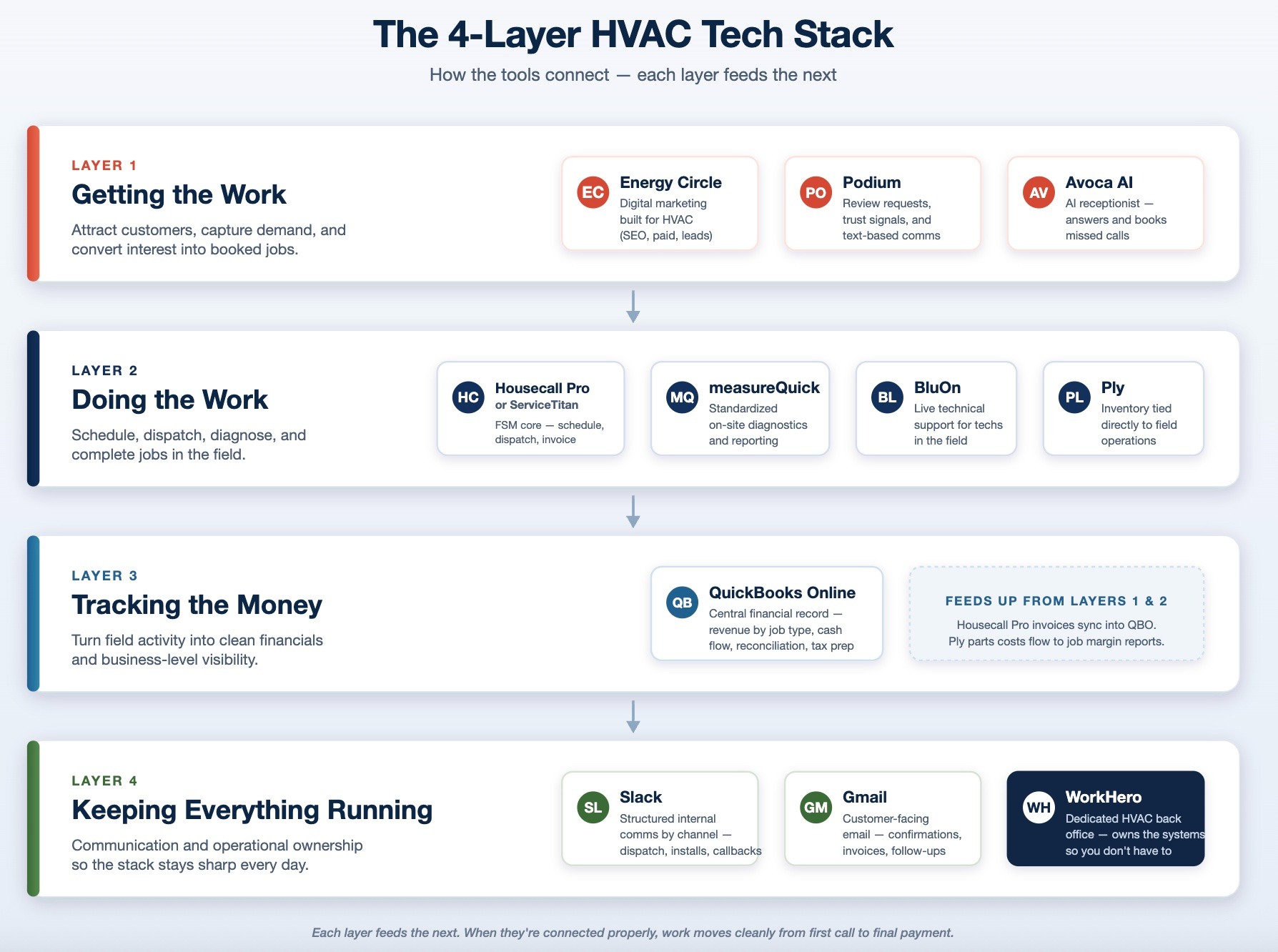
This is what turns a collection of tools into a system. Each layer feeds the next, and when they’re connected properly, work moves cleanly from the first customer interaction all the way through to payment and reporting.
Field Service Management: The Core System Everything Runs Through
The field service platform sits at the center of your operation. It’s where scheduling, dispatching, estimates, invoicing, and customer records all live, and every job should move through it from the first call to final payment.
Many HVAC companies build around one of two platforms: Housecall Pro or ServiceTitan. Both are strong systems, but they’re designed for different stages of growth.
Housecall Pro is generally the better fit for smaller and mid-sized operations. It’s easier to set up, faster to onboard, and doesn’t require a dedicated operations layer to get value from it.
You can manage scheduling, dispatch, estimates, invoicing, and payments in one place without a long implementation process, which makes it a practical choice for teams that want something usable right away.
How Using HousecallPro Helps Your HVAC Business
- Tech finishes a tune-up, collects payment on-site through Housecall Pro, and the invoice is automatically sent before he drives to the next job, with no paperwork or office follow-up needed
- Dispatcher sees two techs finishing early on the same street and reassigns a nearby AC repair in real time directly from the map view
- Customer books a maintenance call at 10pm through the online booking link, and it lands on the schedule without anyone needing to touch it
ServiceTitan is built for larger, more complex businesses. It offers deeper reporting, more advanced workflow automation, and better visibility across multiple teams, departments, and job types. Companies with higher volume, multiple crews, and more structured operations tend to benefit more from the level of control it provides.
Both platforms can support a well-run HVAC business. The right choice depends on the size of the company, how complex the operation is, and how much structure is already in place.
QuickBooks Online - Accounting
Every invoice your team generates in your field service platform needs to land somewhere. QuickBooks is where that financial record lives.
QuickBooks Online is the standard bookkeeping system used across most HVAC companies, and it functions as the central financial record of the business. It’s where invoices, payments, deposits, and expenses are tracked in a structured way that allows you to see revenue trends, cash flow, and overall performance.
In a typical setup, your field service platform generates invoices and collects payments, while QuickBooks records and organizes that information into financial categories. This is where account mapping becomes important, since how revenue is categorized in QuickBooks determines how clearly you can understand which parts of your business are driving income.
Beyond basic bookkeeping, QBO also supports reporting, reconciliation, and tax preparation, making it the system that ties together the financial side of your operation with the day-to-day work happening in the field.
How Using QuickBooks Helps Your HVAC Business
- Owner pulls revenue by job type (installs vs repairs vs maintenance agreements) at the end of the month to see which work is actually profitable
- Reconciles the invoices marked “paid” in Housecall Pro against what actually hit the bank account that week
- Hands a clean P&L to their accountant at tax time instead of digging through receipts
Gmail - Email
Once jobs are scheduled and moving, communication has to follow them. That’s where Gmail comes in.
Gmail is widely used because it integrates cleanly with calendars, scheduling tools, and other platforms in the stack, while staying simple enough that it doesn’t introduce friction into daily work.
It becomes especially useful when tied into your scheduling and FSM system, allowing appointment confirmations, invoice notifications, and customer communication to move seamlessly between platforms.
The familiarity of the interface also matters, since it reduces training time and keeps communication fast and consistent across the team.
How Using Gmail Helps Your HVAC Business
- Appointment confirmation auto-sends to the customer the morning of the job with the tech’s name and arrival window
- Supplier invoice lands in Gmail and gets forwarded to the bookkeeper in one click
Slack - Internal Communication
When a business is moving fast, communication tends to spread across whatever is most convenient at the moment. It works well enough at first, but as the team grows and the job volume increases, that scattered approach starts to create real problems.
Slack replaces scattered communication with a structured system. Conversations are organized into channels that match how the business operates, such as service, install, dispatch, or even individual jobs when needed.
For larger or more complex work, a dedicated channel keeps everything in one place, including photos, notes, updates, and coordination between the field and office.
Instead of digging through messages or asking around for context, the full job history is already there and easy to reference.
Tips For Using Slack
- Office manager drops a photo of a job address with a gate code into the #dispatch channel so the tech doesn’t have to call back
- Parts order comes in, gets posted to #installs, and the crew knows materials are ready without chasing updates
- Owner creates a #callbacks channel so every unresolved issue from the day gets logged and nothing falls through
Avoca AI - AI Receptionist
Every inbound call to an HVAC business represents someone who already has a problem and is ready to book.
The issue is that those calls don't come in at convenient times. They come in while your technicians are mid-job, while your office staff is juggling three other things, and sometimes well outside of business hours.
When no one picks up, most customers don't leave a voicemail, they just call the next company on the list.
Avoca and Ply are listed in the wrong parentheses when compared to where they sit on the chart
It's not a voicemail system or a callback queue. It works in the moment, the same way a receptionist would, except it's available whenever the phone rings.
How Using Avoca AI Helps Your HVAC Business
- 7pm on a Friday, a homeowner’s AC goes down, Avoca answers, collects the details, and books an emergency slot for Saturday morning
- Tech is on a roof and can’t answer the phone, Avoca handles the inquiry and sends a summary to review between jobs
- Office manager is busy with invoicing, Avoca takes inbound calls so she isn’t constantly interrupted
Energy Circle - Digital Marketing
For most HVAC businesses, growth depends on a steady flow of new customers finding you before they find a competitor, and that means showing up in the right places at the right time.
It means running paid ads that actually reach people with immediate needs, not just broad audiences, and building out the kind of local content that earns trust before a customer ever picks up the phone.
The challenge is that digital marketing for HVAC isn't the same as general marketing. The buying intent is high and often urgent, the service area is hyper-local, and the job types vary enough that a one-size-fits-all approach tends to underperform.
Energy Circle is built specifically for HVAC and home performance companies, which means it approaches all of this with the industry already in mind.
Rather than adapting a general marketing framework to fit the trades, it's designed around the three things that actually move the needle for HVAC businesses: search engine optimization, paid advertising, and lead generation.
Because it's purpose-built for HVAC, the strategies aren't being borrowed from another industry and retrofitted. Everything connects more naturally with the rest of your stack, feeding qualified leads directly into your scheduling and dispatch process instead of dropping them somewhere that requires manual handling.
How EnergyCircle Helps Your HVAC Business
- Google search ad targets “AC not cooling [city name]” and captures high-intent calls during peak season
- City-specific service page starts ranking over time and brings in consistent organic leads
- Visitors who didn’t book get retargeted with a follow-up offer like a tune-up special
Podium - Review Management
Reviews have become the primary way customers evaluate trust before they've had any direct contact with a business, which means collecting them consistently can't be left to chance.
Podium automates review requests so they become part of the workflow instead of something handled manually. After a job is completed, customers receive prompts to leave feedback, which increases the likelihood of capturing reviews while the experience is still fresh.
It also centralizes customer messaging, allowing your team to manage conversations from one place rather than across multiple channels.
How Using Podium Helps Your HVAC Business
- Customer gets a text shortly after the job asking for a review, with a much higher response rate than email
- Homeowner texts the business number about pricing, and the office replies from one dashboard instead of using personal phones
- Owner gets alerted to a negative review the same day and can respond before it sits unanswered
Ply - Inventory Management
Parts move constantly in an HVAC business, and keeping track of that movement is genuinely difficult without the right system in place.
Ply is designed specifically for trades and connects inventory management directly to field operations. It tracks parts as they move through jobs, manages purchase orders, and gives visibility into what’s currently available.
This allows both the office and the field to work from the same information, reducing the need for manual tracking or guesswork. Instead of inventory being managed separately, it becomes part of the overall job workflow.
How Using Ply Helps Your HVAC Business
- Tech uses parts on a job and they’re automatically deducted from van inventory, so the office knows to reorder before anything runs out
- Owner sees one tech’s van is consistently low on a specific part and sets a reorder threshold so it triggers automatically
- End of the month, pulls a parts cost report by job to see where margin is getting eaten
BluOn - In-Field Technical Support
Even with a well-run operation, there are still moments where a job doesn’t have a clear next step.
BluOn provides technicians with access to on-demand technical support while they’re in the field. This can include guidance on troubleshooting, system behavior, or specific equipment issues.
The practical effect is that jobs that would have stalled or required a follow-up visit get resolved on the first trip. The technician stays confident, the customer gets an answer the same day, and the schedule doesn't take a hit because one job ran into a complication that nobody had a clean answer for.
How Using BluOn Helps Your HVAC Business
- Tech encounters an unfamiliar heat pump mid-job and gets live guidance instead of calling a supplier and waiting on hold
- Junior tech on a solo job hits a refrigerant issue, gets walked through it in real time, and closes the job the same day
- Tech avoids a second trip on a tricky system by confirming the diagnosis on-site
measureQuick - Diagnostics Support
When two technicians evaluate the same system, they don't always come back with the same findings. Not because one is wrong, but because without a standardized process, diagnostics tend to rely heavily on individual experience and judgment.
That inconsistency makes it harder to track performance over time, harder to document work in a way that holds up, and harder to explain findings to a customer in a way that actually makes sense to them.
measureQuick gives technicians a consistent process for capturing system data and running diagnostics, so evaluations are based on measurable performance rather than gut feel.
The findings get turned into clear reports that are easy to document and easy to walk a customer through, which makes the whole interaction more professional and the work easier to stand behind.
How Using measureQuick Helps Your HVAC Business
- Tech runs diagnostics and generates a report the homeowner can actually understand, making it easier to recommend next steps
- Two techs evaluating the same system follow a standardized process using shared data instead of relying on individual judgment
- System performance is documented on every visit, building a history that protects the business if a warranty issue comes up later
WorkHero - Back Office Support
Even with a well-structured tech stack, the systems still need to be operated consistently. This includes scheduling, invoicing, follow-ups, reporting, and maintaining the tools themselves.
WorkHero provides dedicated office managers who specialize in HVAC workflows and take ownership of the systems that support daily operations. We manage your FSM platform, handle invoicing and A/R, keep your pricebook structured and up to date, and ensure your accounting stays aligned with what’s happening in the business.
Working with us removes the need for you to constantly step in to keep things on track. You’re not answering questions about pricing, checking whether invoices went out, or trying to figure out why something hasn’t been paid.
The back office runs the way it’s supposed to, without pulling you out of the field or slowing you down.
Put WorkHero in charge of your back office.
What a Fully-Stacked Job Looks Like
The easiest way to understand how beneficial using all of these together can be is to see how it works in a real-world scenario.
Here’s what a typical job looks like when everything is connected and working the way it should:
A homeowner searches for “AC repair near me” and lands on your Energy Circle page, where they either call directly or book online.
If they call, Avoca picks up immediately, collects the details of the issue, and schedules the job straight into Housecall Pro. If they book online instead, the job still lands in the same place, already on your schedule and ready to be assigned.
From there, the job lands on your schedule, gets slotted into an open time, and the tech heads out.
Once on-site, the technician runs diagnostics using measureQuick, capturing system data in a structured way that makes the findings clear and consistent.
If something unexpected comes up or the system is more complex than anticipated, BluOn is there in the moment to help troubleshoot and confirm the right approach, so the job keeps moving without needing a second visit.
If a part is used during the repair, that usage is automatically tracked through Ply, updating inventory and giving the office visibility into what needs to be reordered without anyone having to manually log it later.
After the work is completed, the technician collects payment through Housecall Pro, and the invoice is finalized on the spot. That transaction then syncs directly to QuickBooks, where it becomes part of your financial records, categorized properly and ready for reporting, reconciliation, and tax prep.
Shortly after the job is closed, Podium automatically sends a review request while the experience is still fresh, increasing the likelihood that the customer actually leaves feedback.
Throughout the entire process, internal communication happens in Slack, whether it’s dispatch updates, job notes, or quick coordination between the field and the office, while Gmail handles customer-facing communication like confirmations, receipts, and follow-ups.
By the end of the day, WorkHero has made sure the job is fully reconciled, the invoice matches what actually came in, and everything is closed out cleanly without you needing to step in and fix anything yourself.
Where to Start if You’re Under $1M
If you’re running a smaller operation, trying to implement this entire stack at once will just create more problems than it solves.
Start with your field service platform. Get Housecall Pro set up properly and make sure every job actually runs through it, from scheduling to payment.
Once that’s in place, connect QuickBooks and make sure the numbers coming out of your jobs are landing correctly in your financials. That alone gives you visibility most shops don’t have.
From there, focus on tightening the day-to-day operation before adding more tools. That means making sure invoices are going out, payments are being collected, and nothing is slipping through the cracks.
Only after that should you start layering in tools like Avoca or Podium to improve communication and lead handling. Everything else comes later
